WordBrain - Word puzzle game
MAG InteractiveWord
4.4150.65K Reviews
- Version
- 1.50.1
- Installs
- 10.00M
- Age Rating
- Everyone
Screenshots
Our Review of WordBrain - Word puzzle game
 Analysis by Appyee
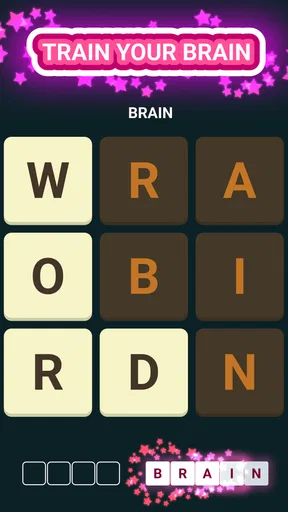
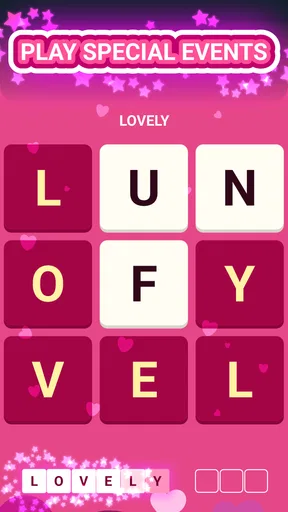
I like word games that let me settle into a puzzle without a long tutorial, and WordBrain makes that first step feel approachable. You look at a grid of letters and swipe a path through them to form a word. The idea is easy to grasp, but the order matters: a choice that seems obvious can leave an awkward set of letters behind, so solving the grid takes more than spotting familiar words.
That makes the game a good fit for a short break when I want something more absorbing than a quick tap game. It is a free word puzzle from MAG Interactive, rated for Everyone, and its 4.5 average across around 954,000 ratings suggests it has found a broad audience. The challenge is not simply to recognize words; it is to think ahead about how each selection changes what remains.
Getting Started with WordBrain
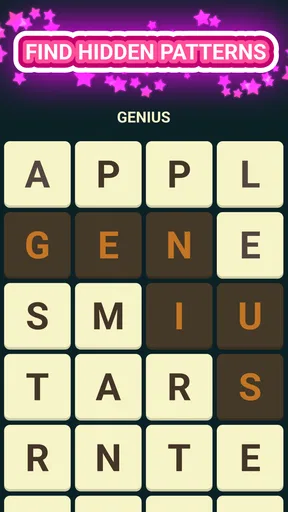
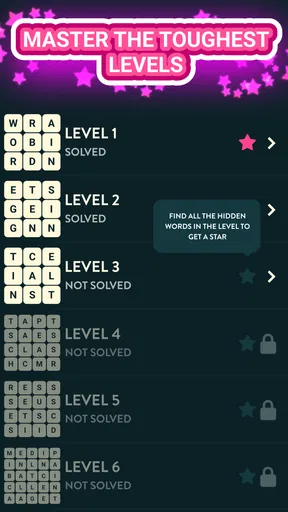
When you first fire up WordBrain, the interface is inviting and straightforward. It doesn’t waste time with frills, which I appreciate. You get right into the action—no fluff, just pure, unadulterated word-searching goodness. As a player, you’re presented with a grid of letters, and the task is to find words hidden within. But here’s the twist: you need to swipe these letters in the correct sequence to unravel the mystery word.
The game starts off easy, almost deceptively so. You might think, "Oh, this is a breeze!" But don’t get too comfortable. The difficulty ramps up quickly, and soon you’ll find yourself scratching your head, pondering over the grid. It’s like the app is saying, "You thought you had it all figured out, didn’t you?"
The Levels and Challenges
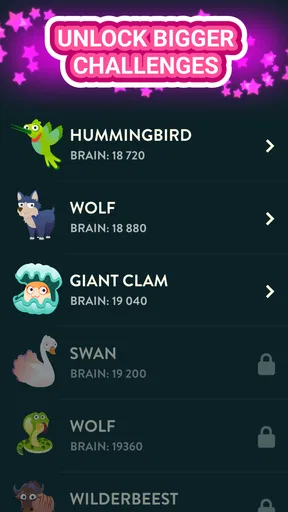
One of the things I love about WordBrain is its progression system. The game features a plethora of levels, each more challenging than the last. You start off as a mere "Ant," but as you solve more puzzles, you evolve—quite literally—into more complex creatures like "Elephant" and beyond. Each level presents new challenges, keeping the gameplay fresh and engaging.
What’s interesting is how each puzzle requires a different approach. Sometimes, you’ll need to uncover multiple words in a specific sequence. Other times, it’s all about spotting the longest word. The variety keeps you on your toes, and I often find myself playing "just one more level" to see what’s next.
A First Session That Feels Manageable
For a first-time player, I would treat the opening puzzles as a chance to learn the game’s logic rather than a vocabulary test. Before swiping, scan the whole grid and think about which letters will remain reachable after a word is removed. That small pause can prevent a common frustration: finding a valid word, selecting it, then discovering that the next required word has become difficult to trace.
A useful habit is to look for more than one possible word before committing. If a short word can be made in two places, consider which route leaves a cleaner arrangement for the next selection. This is where the puzzle differs from a standard word search: the best answer is not always the first word you notice. Planning the sequence matters as much as knowing the spelling.
When I get stuck, I try changing my perspective instead of repeatedly tracing the same letters. I look for a different starting point, check whether a longer word is hiding across the grid, and reconsider the order the puzzle expects. Taking a brief break can also help; returning with fresh eyes is often more useful than swiping randomly. The game rewards patience, but it does not require treating every level like a timed exam.
Where It Fits Into an Ordinary Day
This is an easy game to pick up in a quiet moment: while waiting for a meal, during a short break, or when I want a low-key activity before putting my phone away. A single puzzle gives that moment a clear focus, and the letter grid makes it easy to resume the basic task without learning a complicated control scheme. If you enjoy wordplay but do not want to commit to a long session, that compact structure is a real strength.
It can also work as a shared puzzle without turning into a competitive game. I might show a grid to a friend or family member and compare what each of us notices first. One person may spot a familiar word while another sees a route that keeps the remaining letters usable. That kind of casual collaboration suits the game better than racing through it, especially when one tricky choice can shape the rest of a puzzle.
On the other hand, I would not choose it when I want a story, a rich visual world, or constant action. The appeal is concentrated in the letter challenge. If you prefer games where each session introduces a new setting or a narrative reason to continue, a word grid can feel repetitive even when its solutions change. The same applies if you find spelling puzzles stressful rather than relaxing: the gradual increase in difficulty is part of the draw, but it can also be the point where a casual player decides to stop.
The Levels and Challenges
One of the things I love about WordBrain is its progression system. The game features a plethora of levels, each more challenging than the last. You start off as a mere "Ant," but as you solve more puzzles, you evolve—quite literally—into more complex creatures like "Elephant" and beyond. Each level presents new challenges, keeping the gameplay fresh and engaging.
What’s interesting is how each puzzle requires a different approach. Sometimes, you’ll need to uncover multiple words in a specific sequence. Other times, it’s all about spotting the longest word. The variety keeps you on your toes, and I often find myself playing "just one more level" to see what’s next.
How It Compares With Other Word Games
Compared with a conventional word search, this game asks for more planning. In a typical grid, finding one word rarely affects the rest; here, the sequence of swipes is part of the puzzle, so a seemingly good answer can make later choices harder. Compared with crossword-style games, it relies less on clues and general knowledge and more on seeing letter patterns and managing the board. That makes it approachable if you like word recognition but do not want to solve definitions.
There is a trade-off: a crossword can offer a satisfying clue-solving payoff, while this game’s challenge is more spatial and sequential. If you want to practise spelling and scan for words, the format is a natural match. If you want vocabulary definitions, themed clues, or a head-to-head match, another kind of word game may serve you better. I see this one as a focused solo puzzle rather than an all-purpose word-game collection.
Difficulty, Friction, and Choosing When to Stop
The quick rise in difficulty is both its hook and its main limitation. Early success can encourage you to keep going, but later grids may demand several attempts before the right order becomes clear. That is satisfying when I have the patience for it; when I only have a minute and want an effortless win, it can feel like more concentration than I planned to give. I would not interpret a pause on a hard level as a sign that I have missed an obvious trick—the puzzle may simply need a more careful scan.
Because the game is free to start and offers in-app purchases priced from $0.99 to $14.99 per item, it is worth deciding your own spending boundary before you play. I would first see how far the free experience suits my habits rather than treating a purchase as necessary to enjoy the core idea. If you are setting the game up for a child, its Everyone rating is reassuring, but it is still sensible to review purchase controls on the device, particularly when a shared phone or tablet is involved.
The current version is 1.50.0, and the minimum operating-system requirement is 7.0. It has been available since May 5, 2015, and has reached over 10 million installs. Those details help explain why it feels like an established choice in mobile word puzzles, but the important question for a new player is simpler: do you enjoy working out a word and then planning what to do with the letters left behind? If yes, the basic loop is easy to understand from the first session.
Brain-Boosting Benefits
Aside from being a fun pastime, this game is an excellent mental exercise. It’s like a gym for your brain, honing your vocabulary, spelling, and problem-solving skills. You’d be surprised at how quickly your word recognition improves after just a few sessions. Plus, it’s a fantastic way to unwind after a long day, as it encourages you to focus and think creatively.
Many players find the game addictive, and I can see why. The satisfaction of finding the right word, especially after a tough puzzle, is immensely rewarding. It’s like your brain just did a mini victory dance!
Visuals and User Experience
The game’s design is sleek and minimalistic. The developers have clearly focused on the core gameplay, ensuring that nothing distracts from the puzzle-solving experience. The colors are pleasing to the eye, and the animations run smoothly, even on older devices. It’s these small touches that make the app enjoyable to use.
Navigation is a breeze, and the app performs consistently well, with no noticeable lag or crashes during my playtime. It’s clear that a lot of thought has gone into creating a seamless user experience.
Who I’d Recommend It To
I would recommend it to people who enjoy quietly testing themselves, especially anyone who likes spotting words but wants more structure than an open-ended letter jumble. It is also a reasonable pick for a family member who wants a simple game to dip into at their own pace. The controls are direct, the goal is clear, and the difficulty gives experienced word-game fans something to work through.
I would steer away from it if you mainly want social competition, a relaxed stream of effortless wins, or a game that teaches words through definitions. It is not a substitute for a crossword when clues are the part you enjoy, and it may not suit someone who dislikes being stuck on a puzzle. Knowing that beforehand makes it easier to decide whether its particular kind of challenge sounds fun or frustrating.
Final Thoughts
Overall, WordBrain is a gem for anyone who loves word puzzles. Its combination of simplicity and challenge makes it a standout in the crowded world of mobile games. Whether you’re a casual player looking for something to pass the time, or a word enthusiast eager for a new challenge, this app has something for everyone.
Downloading it is a no-brainer, especially since it’s free with optional in-app purchases. So, why not give it a try and see how far you can go? Trust me, your brain will thank you!
Verdict
Strengths of WordBrain - Word puzzle game
- Engaging puzzles enhance vocabulary.
- Simple interface for easy navigation.
- Regular updates with new levels.
- Offline mode available for on-the-go play.
- Suitable for all age groups.
Limitations of WordBrain - Word puzzle game
- Hints can be costly to purchase.
- Ads may interrupt gameplay sessions.
- Difficulty spikes can be frustrating.
- Limited customization options.
- No multiplayer mode available.
Other Releases by MAG Interactive
View All
Word Domination
Word4.2

Ruzzle
Word4.1

QuizDuel! Quiz & Trivia Game
Trivia3.5

Wordzee! - Puzzle Word Game
Word4.5
Similar Picks in This Category
View All
Word Search - Word Puzzle Game
Bluetile4.8

Word Search Quest - Puzzles
Blackout Lab4.8

CodyCross: Crossword Puzzles
Fanatee, Inc.4.7

Words of Wonders: Crossword
Fugo Games4.9

Wordscapes: Word puzzle game
PeopleFun4.7

Word Search Explorer
PlaySimple Games4.9
Frequently Asked Questions
What is WordBrain, and how does it work?
WordBrain is a challenging word puzzle game where players swipe letters to form hidden words. Starting with simpler puzzles, the game progressively gets more difficult, testing your vocabulary and problem-solving skills. Each level requires you to find the words in a specific order, adding an extra layer of complexity.
Is WordBrain free to play?
Yes, WordBrain is free to download and play on both Android and iOS devices. However, it offers in-app purchases, such as hints and ad removal, which can enhance your gameplay experience. Although these purchases are optional, they may be helpful if you find yourself stuck on a challenging level.
How many levels does WordBrain have?
WordBrain features over 1,200 levels, providing a vast range of puzzles to solve. Each level introduces different challenges, with increasing difficulty that keeps players engaged. The game is frequently updated with new content, ensuring that players always have something fresh to tackle.
Can I play WordBrain offline?
Yes, WordBrain can be played offline once it is downloaded and installed on your device. This makes it a perfect game for playing during travel or in areas with limited internet connectivity. However, some features, such as updates and purchases, require an internet connection.
Are there any strategies to excel in WordBrain?
To excel in WordBrain, it’s important to start by identifying the shortest words first, as they can provide clues for finding longer words. Utilizing hints wisely and taking breaks when stuck can also help. Regular practice sharpens your skills, making it easier to tackle tougher puzzles as you progress.
Play our best games!


